Give doc reviewers a breather: Self-lint before submitting PRs
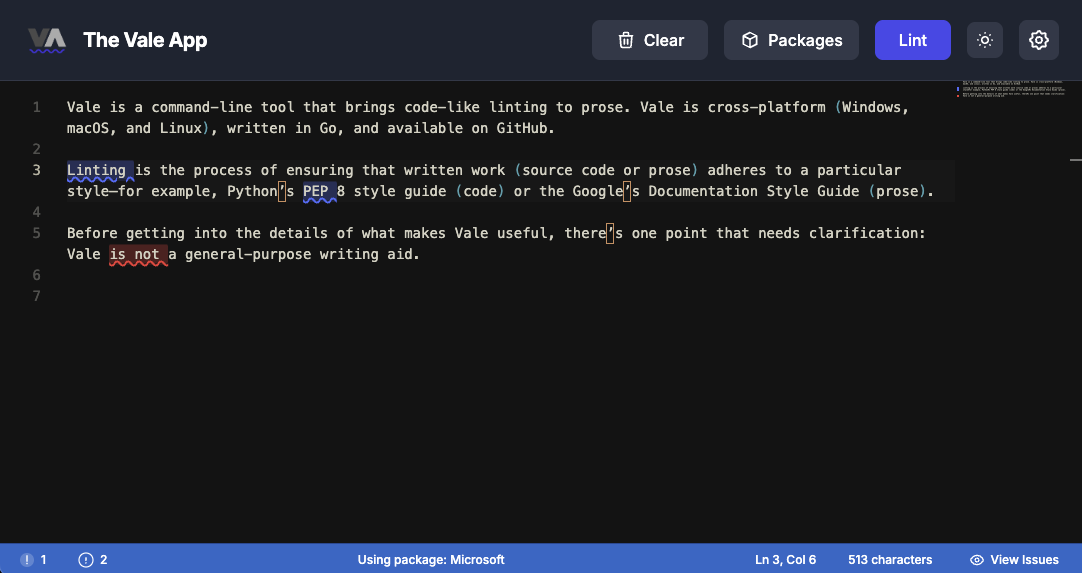
Documentation review fatigue is a real problem. When reviewers such as senior writers, editors, or docs leads spend their time fixing style inconsistencies, typos, and basic writing issues, they have less energy for more important tasks like checking content structure, finding technical errors, and giving strategic feedback on information architecture.
The answer is to lint your documentation before submitting it. By reviewing your own work and using automated style checks, you can catch issues early and let reviewers focus on the content instead of the wording.
The hidden cost of low-quality documentation pull requests
In docs-as-code workflows, every documentation pull request costs reviewer time and attention. When docs arrive with:
-
Inconsistent terminology and capitalization
-
Passive voice and unclear phrasing
-
Typos and spelling errors
-
Style guide violations
-
Markdown formatting inconsistencies
Documentation reviewers have to choose between leaving detailed comments, approving changes even with problems, or rejecting the pull request completely. None of these options help the docs team.
Documentation review fatigue builds up fast. After going through several pull requests with basic quality problems, reviewers may start to rush through later reviews or put them off. This affects not just one pull request, but the whole team's speed and the quality of your published docs.
Why documentation linting matters in docs-as-code workflows
Documentation linting takes care of the small details, so reviewers can focus on what really matters. If you run Vale before submitting a documentation pull request, you can catch:
-
Style guide violations: terminology, brand voice, capitalization rules
-
Clarity issues: passive voice, complex sentences, hedge words, jargon
-
Consistency problems: product names, API references, UI element formatting
-
Common errors: spelling, punctuation, markdown syntax, link formatting
These are the issues that frustrate documentation reviewers the most. They are clear, easy to fix, and should not need a person to catch them. Senior writers and editors have more important work than reminding you to use "K8s" instead of "Kubernetes" or to capitalize "API" every time.
The docs-as-code self-review workflow that works
Here's the documentation pull request checklist that respects your reviewers' time:
Before committing
-
Draft your documentation changes using your normal writing workflow
-
Run Vale locally (CLI, VS Code extension, or browser tool) on every markdown, AsciiDoc, or MDX file you touched
-
Fix the issues Vale catches before staging the commit—style violations, passive voice, terminology inconsistencies
-
Review the diff yourself as if you're the senior writer reviewing—would you approve this?
Before creating the documentation PR
-
Lint the entire docs directory (not just changed files) if your edits affect shared terminology, UI elements, or cross-referenced content
-
Check the documentation preview build if your project has one—verify links, formatting, and navigation
-
Write a clear PR description explaining what content changed, why, and any structural decisions
In the PR description
-
Confirm you've linted: "Ran Vale with Microsoft Writing Style Guide—no violations"
-
Call out intentional exceptions: "Line 47 triggers passive-voice warning but matches existing API reference pattern"
-
Guide reviewers: "Focus feedback on the new conceptual overview in sections 2–3, not the reference tables"
This workflow shifts the burden from reactive (the documentation reviewer finds issues) to proactive (the writer prevents issues). Your reviewers can focus on content quality, technical accuracy, and user experience instead of hunting for typos.
How Vale helps you self-review documentation
Vale is the prose linter designed for technical documentation. It enforces style guides programmatically so you catch problems before human reviewers see them.
What makes Vale effective for PR preparation
Professional style guides built-in: Microsoft, Google, Red Hat, GitLab, and other organizations provide Vale-compatible rule packages. You do not have to guess what good documentation looks like because you are following proven standards.
Actionable, specific feedback: Vale doesn't just say "fix your style." It highlights the exact word or phrase, explains the rule, and often suggests a replacement. You can fix issues in seconds.
Runs everywhere you work:
-
CLI for pre-commit hooks and local checks
-
CI/CD integration to block PRs with violations
-
VS Code extension for real-time feedback while writing
-
Browser tool ProseLint Web for zero-config checking before submission
The browser workflow for quick PR checks
The Vale browser tool is designed for the moment right before you submit your work:
-
Open the editor: No installation, no configuration—just navigate to ProseLint Web
-
Paste or upload your documentation: Markdown, MDX, AsciiDoc, or HTML
-
Select your style guide: Choose the package your team uses (or pick one that matches your voice)
-
Get instant feedback: See highlighted issues with explanations and fix suggestions
-
Apply fixes: Update your local file and re-run to confirm
Since the tool runs completely in your browser using WebAssembly, your documentation never leaves your device. This is ideal for sensitive or pre-release content that you cannot upload to third-party services.
Real docs team impact: what changes when writers lint first
Documentation teams that adopt "lint before PR" workflows report:
Faster documentation review cycles
Documentation reviewers spend less time on style comments and more time on substantive feedback about content structure, technical accuracy, and user experience. PRs merge faster because there are fewer rounds of "please fix this terminology" comments.
Higher-quality editorial feedback
When documentation reviewers aren't exhausted from catching basic style issues, they provide more thoughtful feedback about information architecture, content gaps, and audience appropriateness. Senior writers can focus on mentoring and strategic guidance instead of copyediting.
Better documentation consistency across your docs site
Automated enforcement of style guides means your documentation reads like it came from a single team with a single voice, not from a dozen individual contributors with different writing styles. Users notice when docs are consistent—it builds trust and credibility.
Reduced documentation reviewer burnout
No one likes leaving many comments about capitalization, passive voice, and terminology. Automation takes care of these repetitive tasks, making documentation review less tiring and more rewarding for senior writers and editors.
Easier onboarding for new writers and contributors
New technical writers, junior engineers, and open-source contributors can run Vale before submitting their first documentation PR. They learn the style guide through immediate, actionable feedback rather than through correction-filled reviews that feel discouraging.
Best practices for docs-as-code linting workflows
1. Make it frictionless for all writers
Avoid making the process complicated or requiring many steps. Adding a browser tool link to CONTRIBUTING.md or using a simple one-line CLI command helps all writers, no matter their technical skills, to get started easily.
2. Document your documentation standards
Tell all contributors which Vale package your team uses (Microsoft, Google, Red Hat, etc.) and what threshold you enforce (errors only? warnings included?). Put this in your contributing guide alongside your other documentation standards.
3. Automate what you can enforce
Run Vale in CI on documentation PRs to catch anything that slips through. But position it as a safety net, not a gate—so writers can catch issues locally before CI sees them. Use CI to enforce the baseline, not to shame writers.
4. Be specific about style guide exceptions
Some style rules don't fit every documentation context. Document when passive voice is acceptable (API reference descriptions), which jargon is standard for your users, and what your custom terminology overrides mean. Share these in your style guide.
5. Link the tool in the documentation PR template
Add a checklist item to your pull request template: "☐ Ran Vale linter with [style guide name], no violations or exceptions documented." This makes self-review a standard part of the documentation process, not just an optional step.
Getting started: lint before your next documentation PR
For technical writers and individual contributors
-
Visit the Vale browser editor and bookmark it as part of your writing toolkit
-
Before your next documentation PR, paste your markdown or AsciiDoc and lint it
-
Fix the style issues, typos, and terminology problems Vale catches
-
Submit your documentation PR with confidence that reviewers can focus on content quality and technical accuracy
For documentation teams and docs leads
-
Pick a Vale-compatible style guide that matches your documentation voice (Microsoft, Google, Red Hat, GitLab, etc.)
-
Add a Vale CLI job to CI to enforce the baseline on documentation PRs
-
Link the browser tool in CONTRIBUTING.md for open-source contributors and engineers who won't install local writing tooling
-
Update your documentation PR template to include a "ran Vale with [style guide]" checklist item
-
Lead by example: lint your own documentation changes before submitting, and praise writers who submit clean PRs
Conclusion: Respect for documentation reviewers starts with self-review
Documentation review is one of the most valuable—and most draining—activities in docs-as-code workflows. When you catch your own documentation quality issues before submitting, you give reviewers the gift of focus. They can evaluate content structure, technical accuracy, and user experience, rather than battling style inconsistencies and typos.
Vale makes it easy to review your own documentation. Whether you use the CLI, the VS Code extension, or the browser tool, you can find style and quality issues quickly. This leads to faster reviews, better feedback, less reviewer burnout, and documentation that is consistent, professional, and user-friendly.
Lint your documentation before you submit it. Both your reviewers and your users will appreciate it.
Resources
-
Vale browser linter — zero-config, privacy-first documentation linting for technical writers
-
DraftView — get your docs PR reviewed by stakeholders without requiring GitHub accounts
-
Vale CLI and documentation — the open-source prose linter for docs-as-code workflows
-
Vale packages repository — professional documentation style guides (Microsoft, Google, Red Hat, GitLab, and more)
-
Write the Docs Guide - docs-as-code best practices
Lint your docs for free
Browser-based Vale linting. No install, no sign-up, 100% private.
Open ProseLint WebGet it reviewed without GitHub friction
Share docs PRs with anyone for review. GitHub account optional.
Try DraftView free