Zero‑Config, Browser‑Based Linting with Vale
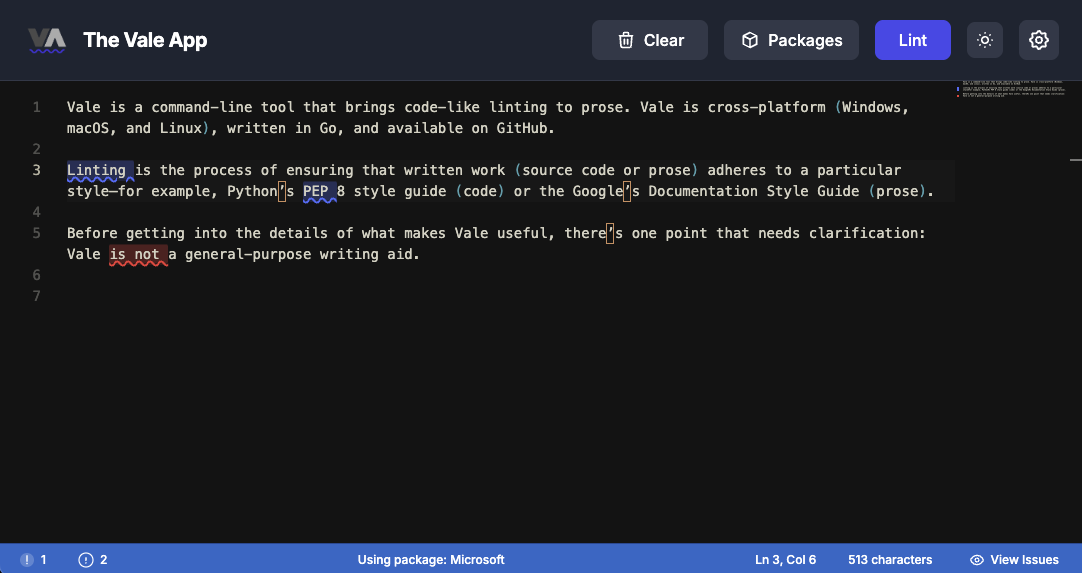
Vale (vale.sh), the open-source prose linter created by Joseph Kato, remains the best-in-class solution for CI and repo-level enforcement. The browser-based Vale experience described here complements Vale’s CLI and CI workflows: it gives writers a zero‑config, privacy-first way to run the same style checks locally—without installs, server round trips, or exposing drafts.
Why linting matters for docs-as-code teams
Linting turns subjective style preferences into repeatable, automatable checks. For technical writers, a good linter delivers:
- Consistency across pages and contributors
- Faster reviews with fewer nit comments
- Clear onboarding for new writers and contributors
- Automated guardrails for tone, terminology, and API doc patterns
If your docs read like several projects stitched together, a linter is the fastest way to fix that.
Vale at a glance for technical writers
Vale is a flexible documentation linter built around rule packages. Each package encodes a style guide (Microsoft, Red Hat, GitLab, Elastic, and more) so you can adopt an industry-tested baseline and then customize what matters to your brand.
Key points for writers:
- Supports Markdown, MDX, AsciiDoc, and HTML — covering most docs-as-code formats.
- Rule packages are modular: pick a base package, then override and create new rules.
- Integrates well both during authoring (VS code extension, CLI) and in CI (Vale CLI) for repository-level enforcement.
Privacy-first linting: why it matters
Many teams hesitate to upload drafts or proprietary docs to third-party services. ProseLint Web's Browser-based Vale linting avoids that tension:
- Runs entirely in your browser (WebAssembly)
- No server contact and no data transmission
- Works offline after rule packages are downloaded
- Preferences and packages stored locally (IndexedDB)
That lets writers lint early and often without exposing unfinished content.
A zero-config browser workflow (what to do today)
- Pick a professional rule package (Microsoft, Red Hat, GitLab, Elastic) that aligns with your voice.
- Open ProseLint Web editor, paste or upload your document.
- Click "Lint" to get instant, actionable feedback with suggestions and quick-fix hints.
This flow removes installation and configuration friction and makes it easy for contributors to check style before submitting PRs.
Practical integration patterns
Use the browser tool as the low-friction entry point and keep Vale CLI/CI as the authoritative gate:
- Authoring and review: writers use the browser linter while drafting.
- Contributor checks: link to the browser linter from CONTRIBUTING.md for people who won’t install local tooling.
- Repo enforcement: keep a Vale CLI job in CI to block rule violations on merge.
- Sync: commit a minimal .vale.ini and document your package so browser and CI stay aligned.
Workflow example: author → browser lint → commit → CI (Vale CLI) lint → merge.
Troubleshooting common pitfalls
- Stale packages: clear browser cache or re-download the selected package.
- Browser vs CI differences: Please report issues and feature requests.
Next steps for your docs team
- Try the browser editor with a real doc.
- Pick one professional rule package that matches your voice.
- Add a short note to CONTRIBUTING.md linking to the browser checker and naming the package.
- Add or keep a Vale CLI job in CI that references the same package for enforcement.
Resources
- Vale (CLI & docs) — https://vale.sh — the open-source project and primary reference for CI-based linting; thanks to Joseph Kato and the Vale community.
- Vale packages repository — https://github.com/errata-ai/packages
Linting should enable writers, not block them. Use Vale’s proven rule packages as your canonical style baseline, let writers run checks privately in the browser during authoring, and use the Vale CLI in CI for authoritative enforcement. The result: more consistent docs, faster reviews, and fewer surprises at merge time.
Lint your docs for free
Browser-based Vale linting. No install, no sign-up, 100% private.
Open ProseLint WebGet it reviewed without GitHub friction
Share docs PRs with anyone for review. GitHub account optional.
Try DraftView free