Private AI Fix: Run a local LLM in your browser, no API key needed
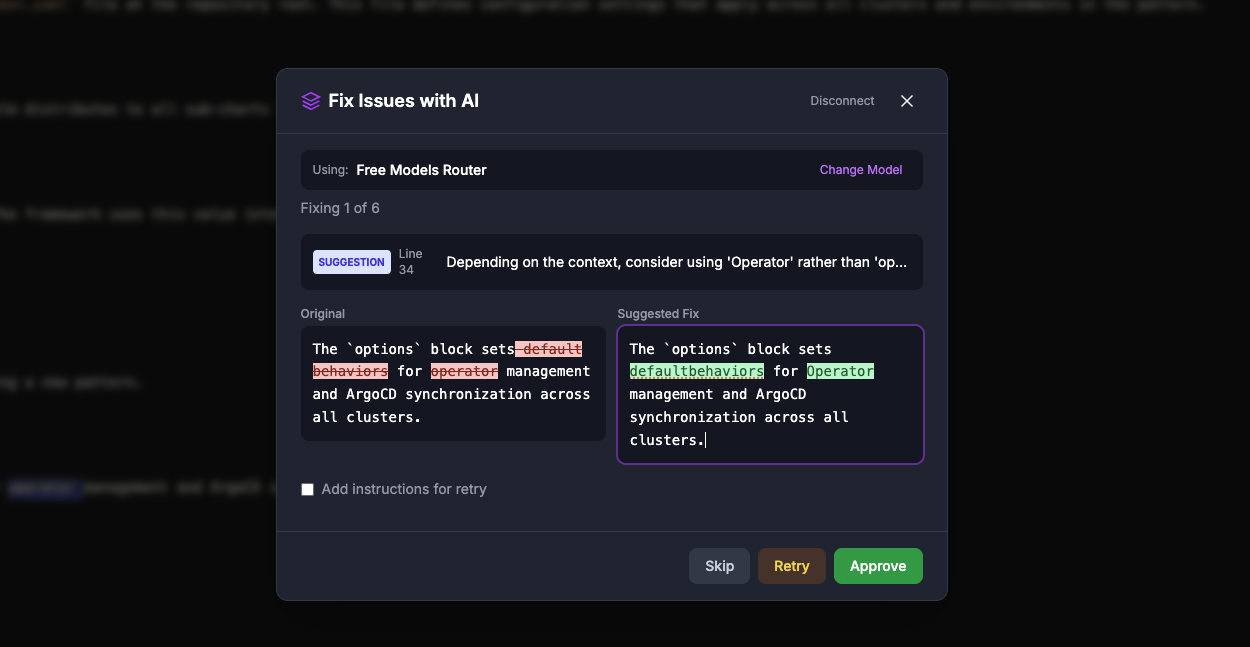
When we introduced AI Fix, the most common question was: "Can I use it without sending my draft to a cloud provider?"
Now you can. AI Fix supports on-device models. You download a small language model once, and the model runs in your browser using your own GPU. There is no account, no API key, and no per-token bill. Your text never leaves your machine.
Vale still lints locally first. The on-device model only helps with the rewrites that a one-click quick fix can't handle.
How it works
Open the editor, lint your file, and select AI Fix. At the top of the model screen you'll see two tabs:
- Cloud · OpenRouter is the original option. You connect your account and pick from hundreds of hosted models.
- On-device · Private runs a model inside your browser.
On the on-device tab, pick a model and select Download. You'll see live progress, and you can cancel at any time. When it finishes, the card shows Downloaded.
That's a one-time cost. Next time you open AI Fix, the model is already there. ProseLint Web skips the setup screen, loads the model into memory while you choose which issues to fix, and gets to work. The review flow is the same as before: a diff for each suggestion, inline editing, and you approve only what you want.
Your choice of tab and model is remembered. You can remove a downloaded model from your device at any time.
Choose a model
| Model | Download size | Best for |
|---|---|---|
| Gemma 4 E2B (recommended) | about 3.2 GB | The best rewriting quality, including tone and multi-issue paragraphs |
| Qwen3 1.7B | about 1.4 GB | A good balance of quality and download size |
| Qwen2.5 0.5B | about 0.5 GB | Quick, simple fixes on lower-end hardware |
Smaller models are faster and lighter, but they follow instructions less reliably. If a suggestion drops words or misses an issue, try a larger model, or reject the suggestion and edit it yourself. As with any AI output, review each change before you approve it.
What your machine needs
On-device models run on WebGPU, the browser's API for using your graphics hardware. There is no CPU fallback, so the checks below matter.
Browser
- A recent version of Google Chrome or Microsoft Edge on Windows, macOS, or ChromeOS is the most reliable choice.
- Recent versions of Safari and Firefox are adding WebGPU support, but availability varies by version and platform. If the On-device tab says WebGPU isn't available, switch to Chrome or Edge.
- Check your browser at
chrome://gpuand look for "WebGPU: Hardware accelerated".
GPU and memory
These figures are approximate. Real usage depends on your browser and operating system.
| Model | Free GPU memory | Example hardware |
|---|---|---|
| Gemma 4 E2B | about 4 GB or more | Apple Silicon Mac with 8 GB or more of memory, or a dedicated GPU with 6 GB or more of VRAM |
| Qwen3 1.7B | about 2.5 GB or more | Apple Silicon Mac, a recent laptop with integrated graphics and 8 GB of RAM, or a dedicated GPU with 4 GB of VRAM |
| Qwen2.5 0.5B | about 1 GB or more | Most computers from the last several years |
A few more things to know:
- Apple Silicon Macs share memory between the CPU and GPU, so they handle these models well. An M-series Mac with 8 GB or more is a good fit for Gemma 4 E2B.
- Integrated graphics (Intel, AMD) work, but they're slower and share your system RAM. Start with Qwen3 1.7B or Qwen2.5 0.5B.
- The models use half-precision shaders (
shader-f16). Most GPUs from the last several years support this. If loading fails with a GPU error, try a smaller model. - Close heavy GPU apps such as games or video editors before loading a large model.
- Phones and tablets are not recommended. The downloads are large and memory is limited.
Disk space and offline use
The model files are stored in your browser's cache, so make sure you have free disk space for the download size above. ProseLint Web asks the browser to keep the files instead of clearing them when storage is low.
Once a model is downloaded, AI Fix works offline. If your browser or you clear site data, the model is removed, and you'll just need to download it again.
Privacy
With an on-device model, your document, your issues, and the suggested rewrites all stay in your browser. The only network request is the one-time model download, which comes from Hugging Face. Nothing about your writing is sent anywhere.
That makes it a good fit for unreleased product docs, internal runbooks, and anything under an NDA, where a cloud model isn't an option.
Local or cloud?
Use on-device when privacy matters, when you're offline, or when you don't want to manage an API key.
Use OpenRouter when you want the strongest hosted models, when your hardware is modest, or when you'd rather not download a large file.
You can switch between them at any time from the model screen. See the AI Fix introduction for more on the review workflow, and our guide to quick fixes for the mechanical edits you should reach for first.
Try it
Open the editor, lint a draft, choose AI Fix, and switch to On-device · Private. Start with Gemma 4 E2B if your machine can handle it, or Qwen2.5 0.5B if you want to see it working in under a minute. We'd love to hear which models you'd like us to add next.
Lint your docs for free
Browser-based Vale linting. No install, no sign-up, 100% private.
Open ProseLint WebGet it reviewed without GitHub friction
Share docs PRs with anyone for review. GitHub account optional.
Try DraftView free