Format-Aware Linting: Skip Shortcodes, JSX, and HTML Elements in ProseLint Web
If you have ever linted a Hugo page or an MDX component file, you know the problem: Vale flags shortcodes, JSX expressions, and inline code as style issues. A {{< highlight go >}} block triggers warnings about capitalization. An MDX expression like {#section-id} produces false positives about punctuation. The issues panel fills up with noise that has nothing to do with your actual writing.
Vale already supports powerful configuration options to handle this — TokenIgnores, BlockIgnores, IgnoredScopes, and SkippedScopes — but they require editing a .vale.ini file with regex patterns. ProseLint Web v0.2.0 brings these Vale capabilities to the browser through format presets and HTML scope filtering toggles, so you can configure what Vale skips without writing any configuration by hand.
This is Part 2 of a three-part series on v0.2.0 features. Part 1 covers custom rules, and Part 3 covers custom vocabulary.
The false positive problem
Vale lints the text content of your document. When that document contains non-prose syntax — shortcodes, template directives, JSX tags, inline code — Vale treats that syntax as regular text and applies writing rules to it. The result is a flood of irrelevant warnings:
- Shortcode parameters flagged for capitalization or spelling
- Template variables flagged as undefined terms
- JSX attributes flagged as sentence fragments
- Code samples flagged for passive voice or word choice
These false positives are worse than annoying. They bury real issues, making it harder to find the style violations that actually matter. Writers learn to ignore the issues panel entirely, which defeats the purpose of linting.
Format presets
Vale uses regex patterns in its configuration to skip specific syntax. ProseLint Web packages these patterns into easy-to-enable presets — currently Hugo and MDX — so you get the right ignore rules with a single toggle.
Hugo preset
The Hugo preset ignores all common Hugo shortcode patterns:
Inline shortcodes — Both {{< shortcode >}} and {{% shortcode %}} delimiters are skipped, along with their content. This covers paired shortcodes like {{< highlight >}}...{{< /highlight >}} and self-closing ones like {{< ref "page.md" >}}.
Shortcode links — Hugo's reference-based links like [link text]({{< ref "page.md" >}}) are treated as a single token that Vale ignores entirely.
Highlight blocks — Fenced code blocks using Hugo's {{< highlight >}} syntax are skipped as block-level content, so code samples inside them are never linted.
Block-level shortcodes — Shortcodes that occupy their own line (like content dividers or section wrappers) are recognized and excluded.
With the Hugo preset enabled, a page like this produces zero false positives from shortcodes:
---
title: "Deployment Guide"
---

Use the following command to deploy:

{{< highlight bash >}}
kubectl apply -f deployment.yaml
{{< /highlight >}}

For more details, see the [configuration reference]({{< ref "docs/config" >}}).

{{% notice warning %}}
Back up your data before proceeding.
{{% /notice %}}
Without the preset, Vale would flag "kubectl", "yaml", "config", and parts of the shortcode delimiters themselves.
MDX preset
The MDX preset handles inline MDX expressions that use the {#...} syntax. These expressions often appear as heading IDs, component props, or interpolated values. The preset tells Vale to treat them as non-prose tokens.
## Getting Started {#getting-started}

<Callout type="warning">
  Always validate your input before processing.
</Callout>
The {#getting-started} expression is skipped. Vale lints only the heading text and the callout content.
How Vale's ignore patterns work under the hood
Vale's configuration supports two types of ignore patterns (documented at vale.sh):
TokenIgnores — Regex patterns that match inline text. When Vale encounters a match, it treats it as a single opaque token and skips it. This is used for shortcodes, template variables, and inline expressions that appear within prose sentences.
BlockIgnores — Regex patterns that match multi-line blocks. When Vale encounters a match, it skips the entire block. This is used for code blocks, highlight blocks, and block-level shortcodes that occupy their own lines.
ProseLint Web's format presets combine both token and block patterns into a single toggle, covering all the syntax variations in a given framework. These are the same patterns you would add manually to a .vale.ini file when using the Vale CLI.
HTML scope filtering
While format presets handle framework syntax, scope filtering exposes Vale's built-in scoping system. Vale converts Markdown to HTML before linting, so HTML elements like <code>, <pre>, and <kbd> appear in every document. Vale's IgnoredScopes and SkippedScopes configuration options control which of these elements are excluded — ProseLint Web surfaces these options as simple toggles.
Ignored scopes (inline elements)
Vale's ignored scopes are inline HTML elements whose text content Vale skips but that don't disrupt the surrounding sentence. These elements typically appear inside paragraphs:
| Element | Description | Example |
|---|---|---|
<code> |
Inline code | Press Enter to continue |
<tt> |
Teletype / monospace text | The <tt> element for legacy monospace |
<kbd> |
Keyboard input | Press Ctrl+C to copy |
<samp> |
Sample output | The command outputs OK |
<var> |
Variable names | Set maxRetries to 5 |
When you enable <code> as an ignored scope, backtick-delimited text in Markdown (which renders as <code>) is excluded from linting. Vale still lints the rest of the sentence around it.
Skipped scopes (block elements)
Vale's skipped scopes are block-level HTML elements that Vale excludes entirely, including all nested content:
| Element | Description | Why skip it |
|---|---|---|
<pre> |
Preformatted text blocks | Code blocks should not be linted for style |
<script> |
Script blocks | JavaScript is not prose |
<style> |
Style blocks | CSS is not prose |
<figure> |
Figure elements | Captions and alt text inside figures may need different rules |
Ignored vs. skipped: what is the difference?
The distinction matters for how Vale processes surrounding text:
Ignored scopes are inline. Vale sees the sentence around them and lints it, but treats the element's content as invisible. A sentence like "Run the deploy command" is linted as "Run the command" — the inline code is transparent.
Skipped scopes are block-level. Vale treats the entire block as if it does not exist. A <pre> block between two paragraphs is completely excluded — no rules run against any of its content.
How to enable format and scope settings
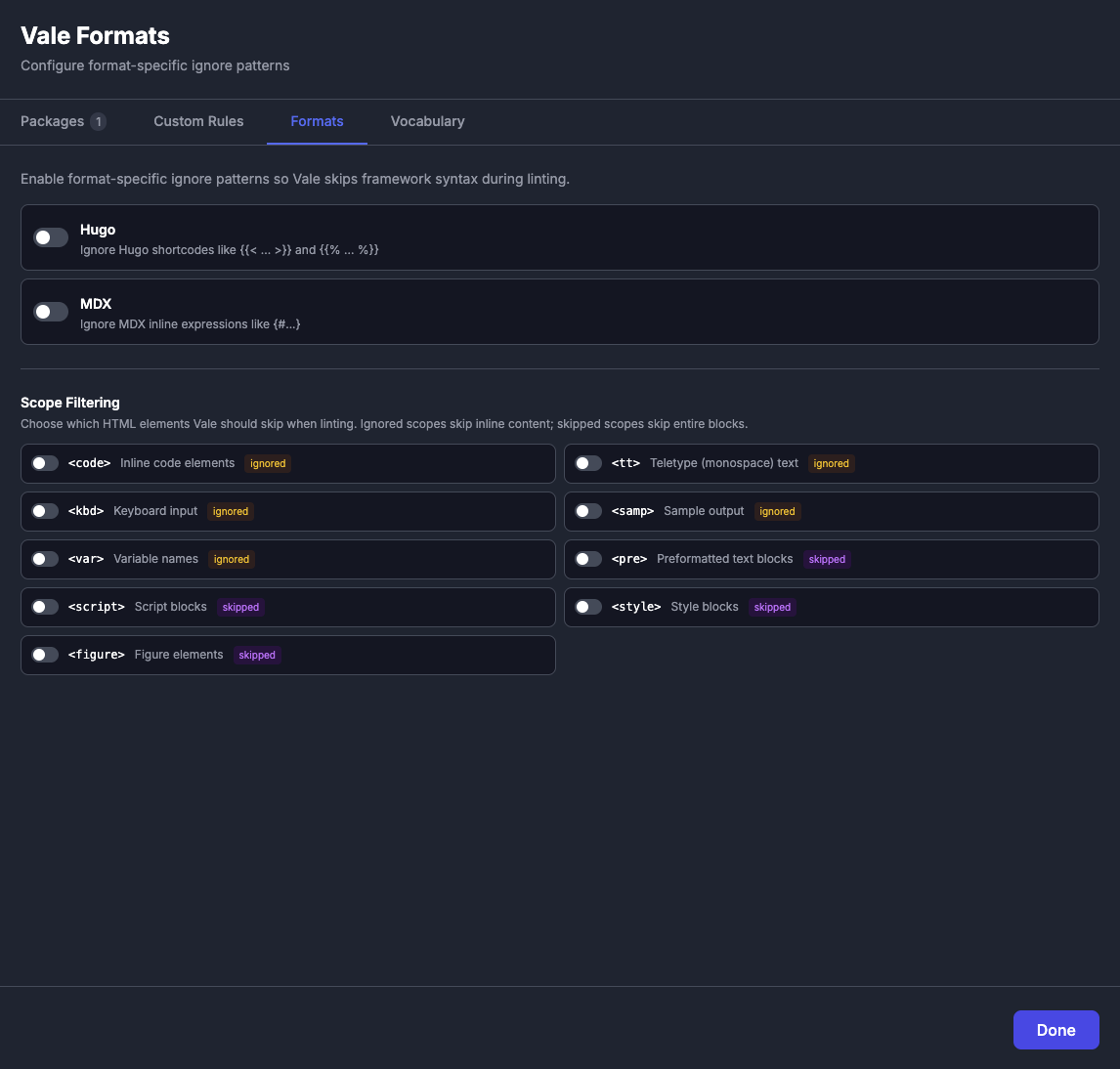
Open the Packages modal and go to the Formats tab. You will see two sections:
Format Presets — Toggle Hugo and MDX presets on or off. Each preset has a description explaining what syntax it covers.
HTML Scope Filtering — Toggle individual HTML elements on or off. Elements are grouped by type (inline vs. block) with descriptions of what each one represents.
Changes take effect immediately. ProseLint Web re-lints your document with the updated configuration, and any false positives caused by the excluded syntax disappear from the issues panel.
When to use each feature
Use format presets when your document contains framework-specific syntax. If you are writing Hugo content with shortcodes, enable the Hugo preset. If you are writing MDX with inline expressions, enable the MDX preset. Both can be active simultaneously if your workflow spans multiple frameworks.
Use scope filtering when HTML elements in your rendered output generate false positives. The most common case is inline code — enable the <code> scope to stop Vale from flagging variable names, command names, and code snippets inside backticks.
Combine both for the cleanest results. A Hugo site with inline code benefits from the Hugo format preset and the <code> scope filter working together.
Try it
Open the ProseLint Web editor, paste a document with shortcodes or inline code, and check the issues panel. Then open Packages, go to the Formats tab, enable the relevant presets and scopes, and watch the false positives disappear.
Resources
- Vale — the open-source linter that powers ProseLint Web
- Vale scoping documentation — how Vale handles ignored and skipped scopes
- Vale configuration documentation — TokenIgnores, BlockIgnores, and more
- ProseLint Web editor — access Vale's format and scope settings in the browser
- Part 1: Custom rules — Vale's check types via a visual builder
- Part 3: Custom vocabulary — accept and reject word lists
Lint your docs for free
Browser-based Vale linting. No install, no sign-up, 100% private.
Open ProseLint WebGet it reviewed without GitHub friction
Share docs PRs with anyone for review. GitHub account optional.
Try DraftView free