ProseLint Web v0.2.0: Custom Rules, Vocabulary, and Cleaner Lint Results
ProseLint Web v0.2.0 is now live. This release focuses on one goal: making Vale easier to use for real documentation workflows in the browser.
If you write docs with Markdown, AsciiDoc, MDX, or use Hugo shortcodes, you can now configure more of Vale visually — without YAML setup, local installs, or extra tooling.
What's new in v0.2.0
1) Create custom Vale rules without writing YAML
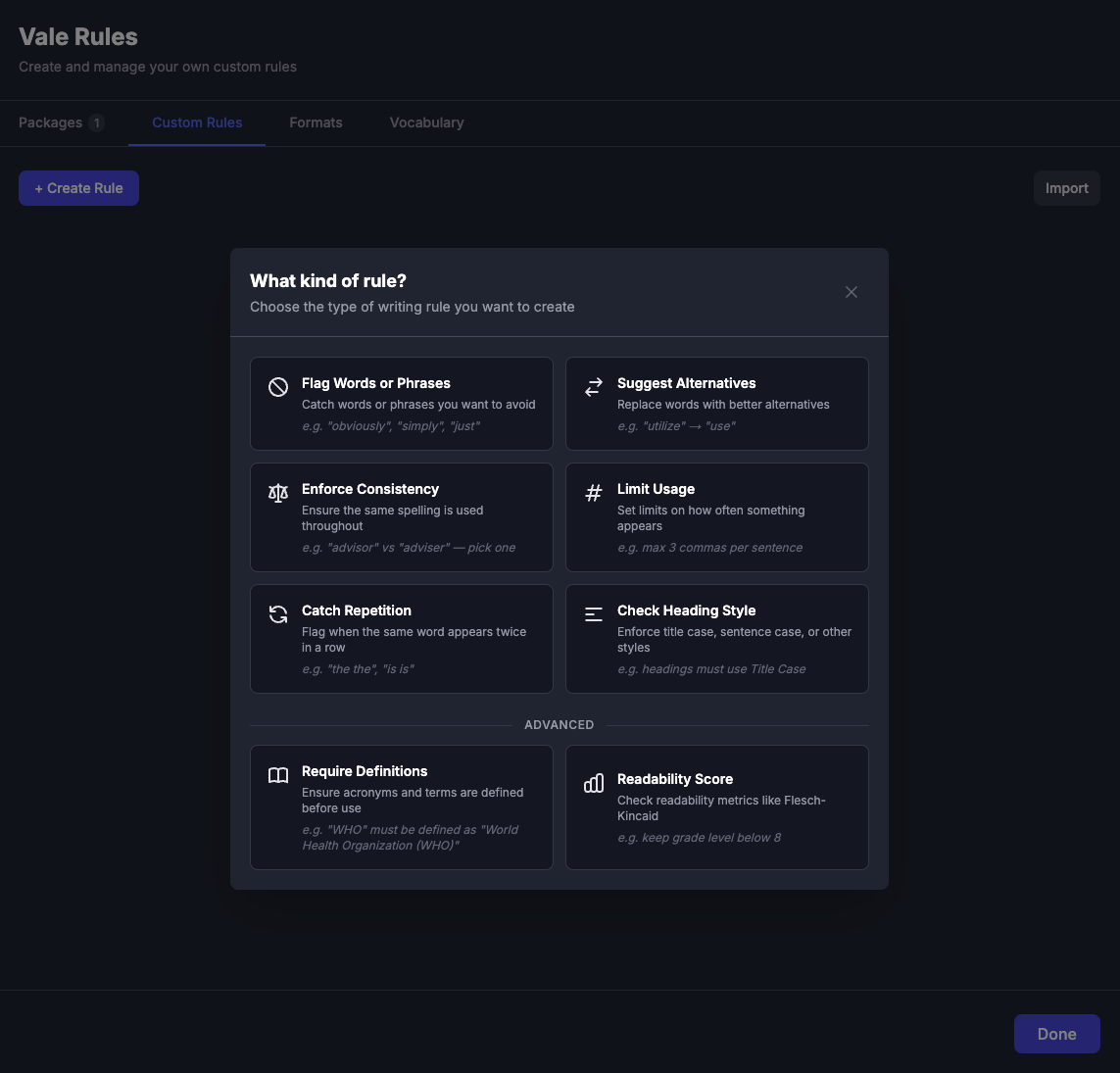
You can now build custom rules from the UI in the Packages → My Rules tab.
ProseLint Web v0.2.0 supports all 8 Vale check types through a visual builder:
existence(flag words/phrases)substitution(suggest alternatives)consistency(keep terms/spelling consistent)occurrence(limit usage)repetition(catch repeated words)capitalization(enforce heading/text case)conditional(require definitions)metric(readability thresholds)
What this means for you:
- Enforce team-specific writing rules in minutes
- Apply terminology standards without maintaining YAML files
- Enable, disable, edit, or delete rules anytime from one place
- Export generated rules as standard Vale YAML for CLI/CI use
- Import and share rules as files for team reuse
Deep dive: Create Custom Writing Rules Without YAML in ProseLint Web
2) Custom vocabulary (accept/reject lists)
You can now manage vocabulary directly in the browser:
- Accept list: words that should never be flagged (product names, acronyms, domain terms)
- Reject list: words that should always be flagged (deprecated terms, banned wording)
What this means for you:
- Reduce false positives on brand and technical terms
- Consistently block prohibited wording across docs
- Import/export plain text word lists for team sharing
Deep dive: Custom Vocabulary: Accept and Reject Word Lists in ProseLint Web
3) Format-aware linting and scope filtering
v0.2.0 adds visual controls for Vale ignore/scoping behavior:
- Format presets for Hugo and MDX patterns
- HTML scope filtering for inline/block elements like
<code>and<pre>
What this means for you:
- Prevent shortcode/JSX/template syntax from polluting lint results
- Skip front matter and other format-specific noise in supported presets
- Keep issues focused on prose quality, not markup noise
- Get cleaner diagnostics in mixed-content documents
Deep dive: Format-Aware Linting: Skip Shortcodes, JSX, and HTML Elements in ProseLint Web
4) Faster, more reliable feedback when settings change
v0.2.0 includes linting flow improvements tied to settings updates and vocabulary handling.
What this means for you:
- More consistent re-lint behavior after configuration changes
- Better reliability in vocabulary import/use flows
- Smoother modal interactions while configuring lint options
5) Redesigned package rule controls
v0.2.0 improves how you manage package rules with a compact layout that surfaces more context while you configure checks.
What this means for you:
- Scan and adjust rules faster in a denser, easier-to-review grid
- See severity and check-type context while deciding what to enable
- Spend less time navigating settings when tuning style packages
New tutorials (8 practical custom-rule walkthroughs)
v0.2.0 also ships a full tutorial set for creating real-world custom Vale rules in ProseLint Web:
- How to Catch Repeated Words with a Custom Vale Rule
- How to Enforce Heading Capitalization with a Custom Vale Rule
- How to Enforce Word Choice Consistency with a Custom Vale Rule
- How to Ban Filler Words with a Custom Vale Rule
- How to Limit Phrase Usage with a Custom Vale Rule
- How to Enforce Readability Targets with a Custom Vale Rule
- How to Require Acronym Definitions with a Custom Vale Rule
- How to Suggest Plain-Language Alternatives with a Custom Vale Rule
These guides are step-by-step and screenshot-driven, so you can copy the workflow and adapt rules to your own style guide.
What v0.2.0 means for documentation teams
With v0.2.0, ProseLint Web moves from "quick browser linting" to a stronger day-to-day style governance workflow:
- Build and manage custom style rules in UI
- Control what Vale ignores in mixed markup content
- Maintain shared vocabulary standards
- Keep everything local/browser-based, then export to the Vale ecosystem when needed
If your team already uses Vale packages, v0.2.0 gives you a practical way to add your own organization-specific standards on top.
Try ProseLint Web v0.2.0
Open the ProseLint Web editor, load any document, and explore:
- Packages → My Rules for custom rules
- Packages → Vocabulary for accept/reject lists
- Packages → Formats for presets and scope filtering
Then run lint and compare results before/after configuration — especially on docs with shortcodes, inline code, or domain-heavy terminology.
Resources
Lint your docs for free
Browser-based Vale linting. No install, no sign-up, 100% private.
Open ProseLint WebGet it reviewed without GitHub friction
Share docs PRs with anyone for review. GitHub account optional.
Try DraftView free